AI-Powered Search Tools Explained
Whether you have a specific song in mind or are looking for inspiration – our AI-powered search functions help you find the perfect music faster and more precisely.
Enter a song, upload an MP3, or describe what you’re looking for – our AI will do the rest!
1. Find by Tune Match – Enter a Known Song

Perfect if you already have a specific track in mind!
- Enter the artist and song title.
- Our search uses Spotify data to display song covers.
- Click on your chosen song to see similar tracks from the Soundtaxi catalog.
⚠ Note: The original songs from Spotify are not available for licensing – they are only used as a reference for similarity search.
2. Find by Your MP3 – Use a Song as Reference

Do you have a music file that you want to use as a reference? No problem!
- Upload an MP3 file.
- The AI analyzes the song.
- You will receive alternative tracks from the Soundtaxi library.
- Extra feature: Use the Range Selector to select a specific part of the song for even more precise results.
3. Find by Smart Text – Use Natural Language

With our intelligent text search, you can find music exactly as you imagine it – without needing technical terms or genre knowledge! Simply describe what you're looking for – whether it’s a film scene, a mood, an instrument, or a musical style.
🔹 Describe the music in full sentences – the more details, the better the results.
🔹 Combine different aspects, such as moods, instruments, and situations.
Example searches:
1. Describing sound & instruments
- “Staccato strings with a piano playing only single notes”
- “Laid-back future bass with defiant female vocal”
2. Describing film scenes & atmosphere
- “The football team is getting ready for the game”
- “A detective scene in a dimly lit office with a melancholic mood”
3. Describing activities & moods
- “Mellow California rock for a road trip”
- “Soundscapes for silent work and concentration”
Try it now and find the perfect music for your project with just your words! 🚀
4. Similarity Search – Find Tracks That Sound Like Your Favorite

Found a sound you love? Discover similar songs with just one click!
- Click on the „=“-icon next to a song.
- The AI analyzes the song and suggests suitable alternatives.
- Extra feature: If you're looking for just a specific part of a song, you can use the Range Selector to refine your search.
5. Standard Search – The Classic, Flexible Search
For users who prefer to search without AI assistance.
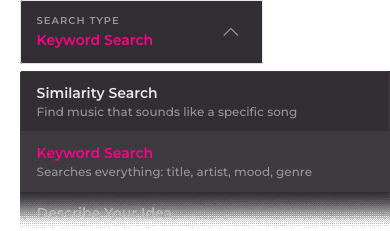
- Simply enter genres, artists, instruments, or keywords – everything can be flexibly combined.
- Our powerful Elastic Search scans the entire catalog and delivers the best results in real-time.
6. The Range Selector – Precise Sound Analysis

Select the best part of a song as a reference!
- The Range Selector is available for MP3 search and similarity search.
- Choose a specific section of the song to use as the search reference.
- Perfect if you're looking for a distinctive riff, an epic drop, or a specific melody line.
The AI Search Explained – Watch the Video!
This short tutorial introduces and explains the features of our AI-powered search.
